Telenor Balance Check Code|Complete Guide 2025
If you are a Telenor user, checking your mobile balance is quick and simple. By dialing the official Telenor Balance Check Code, you can instantly know your remaining credit and avoid the hassle of unexpected call drops or service interruptions. Keeping track of your balance is essential to ensure uninterrupted calls, SMS, and internet usage. Whether it’s an urgent call or browsing online, knowing how to check your Telenor balance saves both time and frustration.
Telenor provides multiple convenient methods for a quick and easy Telenor SIM balance check. This guide covers all the official ways to perform a Telenor balance enquiry, including USSD codes, SMS, the MyTelenor app, helpline services, and alternative options. How to Check Telenor Number
Key Takeaways
- Telenor Balance Check Code: Dial *444# to instantly check your remaining balance.
- Service Charges: A small fee (around Rs. 0.24 + tax) applies for each balance inquiry.
- Alternative Methods: Balance can also be checked via the My Telenor App, helpline (345), or SMS services.
- Quick Access: Keeping track of your balance ensures uninterrupted calls, SMS, and internet usage.
- User Convenience: Telenor offers multiple balance check options to suit both smartphone and feature phone users.
Telenor Balance Check Code Methods
1.Telenor Balance Check Code (USSD Method)
The most popular and direct way to check your Telenor balance is by using a USSD code.
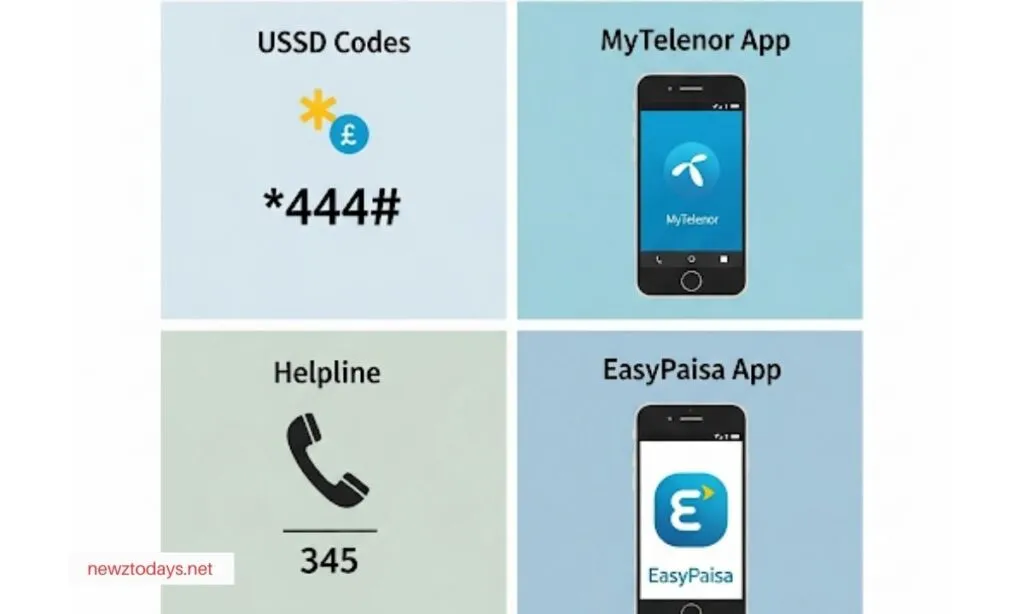
Official Telenor Balance Check Code 2025: *444#
- Dial
*444#from your Telenor number. - Your remaining balance will appear on your screen instantly.
- Service charge: around PKR 0.24 (including tax).
2. Check Telenor SIM Balance via SMS
While there is no direct SMS option for checking the main balance, Telenor allows users to check specific package balances using USSD codes:
- SMS balance → Dial
*111# - Minutes balance → Dial
*222# - Internet MBs balance → Dial
*999#
Note: These services may have nominal charges.
3. Telenor Balance Check via MyTelenor App
For a modern, free, and user-friendly experience, the MyTelenor App is the best option.
- How to use: Download the app from Google Play or App Store, then log in with your Telenor number.
- Benefits: The app dashboard shows your main balance, remaining MBs, SMS, and free minutes in real-time.
- Cost: Completely free to use.
This is the most detailed and cost-free way to perform a Telenor SIM balance check.
4. Telenor Balance Check Through Helpline
If you prefer customer support, Telenor’s helpline is another reliable method.
- Dial 345 from your Telenor SIM.
- Follow the IVR (automated menu) instructions.
- Select the balance enquiry option.
Note: Standard call charges may apply.
5. Alternative Method – EasyPaisa App
Since EasyPaisa is a Telenor Microfinance Bank product, it is also linked to Telenor SIMs.
- Download the EasyPaisa app.
- Check your mobile wallet balance, which is directly tied to your Telenor number.
6. Telenor Balance Check Charges (Summary Table)
| Method | Code/Action | Charges (PKR) |
|---|---|---|
| USSD Code | *444# | ~0.24 (Incl. Tax) |
| SMS | Package-specific | Nominal charges |
| MyTelenor App | Install & Log In | Free |
| Helpline | Dial 345 | Standard call charges |
| Note: Charges may change depending on Telenor’s policies. |
7. FAQs on Telenor Balance Check
Q: What is the code to check Telenor balance?
A: The primary balance check code is *444#.
Q: How can I check Telenor SIM balance without charges?
A: The MyTelenor App provides free real-time balance updates.
Q: Is there a free method for Telenor balance enquiry?
A: Yes, the MyTelenor App is completely free.
Q: Does the balance check code work on all Telenor SIMs?
A: Yes, *444# works on all prepaid SIMs. Postpaid users should check balance via the app or helpline.
Conclusion
Telenor users in Pakistan have multiple options for balance enquiry, from quick USSD codes like *444# to the free MyTelenor App. While most methods carry a small fee, the app remains the most detailed and cost-free way to track your account. Read More Stories on NewzToday